


moremeba
Members
-
Joined
-
Last visited
-
Hi Tom, i have electrified my Brompton using a kit i purchased from Ourider www.h9.com.cn They were very helpful and speak good English. The kit has been very reliable so far but i guess i have only put about 1000 miles on it so not much of a soak test. What Brompton do you have....mine is the M3.
-
Hi Nealh, thought i would let you know the cells did not hold a charge so i guess they will will need replacing. I have contacted Jimmy at Innsat to see if he can re-furbish the pack for me. Thanks again for taking the time to reply to my posts and the pointers you gave me, your advice will certainly help me troubleshoot any similar problems i may come up against in the future. Best regards Barry
-
Many thanks for the explanation Nealh. i will give this a try today to see if i can bring the cells up and let you know the outcome. Regards Barry
-
Thanks for the quick reply Nealh. Could you just explain this sentence a little further please? "identify the correct cell group pin on the jst connector and place the red lead/pin in to it and the black pin to the cell group pin out before and see if it charges up." Do you mean connect the red+ side of the phone charger to the connector on the LHS of this photo or to the one on the BMS board? Where would i need to connect the Black- side of the phone charger please? Regards Barry


-
Hi all, was wondering if someone could assist me please? My 24V battery has gone LV on a bank of cells so subsequently the BMS has cut out. I have measured the voltage on and all but 2 banks are reading 4.12 volts, with one bank reading 3.8v and the other reading 0.30 volts. Is there anyway i can just re-charge the low bank to see if i can get the BMS to kick in again and then do a balance charge up? Photos below Any help really appreciated. Cheers Barry


-
Thanks again d8veh for the advice. I took the controller apart. There is no obvious damage to the board but the 78M05 voltage regulator looks burnout. That was the only obvious damage i could see. I have order some from RS to see if that cures the problem. Best Regards
-
Hi oldgroaner. I did not try your suggestion of spinning the motor manually to get it spinning. Trouble is i have fried the controller now so cannot even try your suggestion. From what i can make out the voltage regulator on the board seems fried as i cannot get the any power to the throttle or pedelec dispaly. I have contacted outrider to see if they will send me a new controller as i cannot seem to find a compatible one elsewhere. Trouble is the lead time from them is approx 2 weeks and i was hoping to send the motor away to get it laced but dont want to do that until i prove it works. Best Regards
-
Hi d8veh, i well and truly ballsed up the wiring and looks like i have fried the controller. I connected all up as i thought it should be:- Yellow motor to yellow controller Green motor to green controller Blue motor to blue controller Red and black to the battery The display connector to what i thought was correct The throttle to what i thought was correct. However i could not get the motor to spin with the throttle or the display control After a lot of changing around to prove things i think i ended up mistakenly putting the 2 wire red/black connector into the throttle yellow/brown and thats when i heard a noise from the controller and now i cannot even get the display control to light the LEDS. So i assume i have ruined the controller. Would you know where i can get one or do i need to go back to outrider? I wanted to prove the motor works before i send it off to be laced into my wheel. Many thanks
-
Many thanks d8veh for such a detailed response. I will try out today. Best Regards
-
Hi Alan, many thanks for taking the time to reply. The throttle has a switch so i guess that what the extra 2 x wires are for. Now i just need to understand what pair of wires from the controller to connect these to. Regards
-
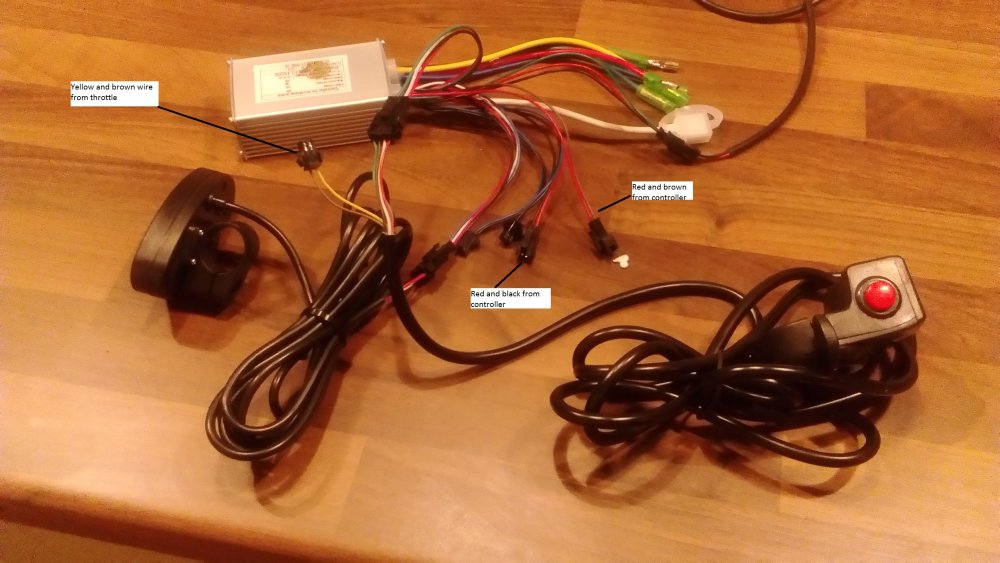
Hi all, my conversion kit for my Brompton has arrived from China, however there are no wiring instructions for the controller. Most are obvious and by process of elimination i think i have got them all but one. The throttle has a 4 wire plug which i assume is to control the motor and a 2 wire plug(yellow and brown wires) for what i assume is to provide power to the throttle. Its the 2 wire plug that i am stumped with. The controller has 2 x possible leads that will fit the 2 wire plug. One is red and black, the other is red and brown. Would anyone know what one i should use? Please see photograph that my explain the above better. Many thanks as always Barry
-
Hi Patpatbut, I purchased the battery last year off someone on the endless sphere forum. It does not have a bms wired into it. Currently I have it working on my currie electro drive but will be utilizing the battery more when I get the Brompton hooked up so wanted to make sure it is getting balance charged etc. Regards
-
Thanks for all the help everyone. I sourced the motor and controller from outrider in China. One more question would be could anyone recommend a BMS for my 36v Samsung 18650 battery pack? Regards
-
Thanks Gents. I will have a look around the brompton talk page. Best Regards
-
Hi all, I have the following:- 3 geared Brompton 36V Li-Ion battery Lyen Controller 9 fet I am assuming I will just need a suitable motor in order to add electric to my Brompton. I cant seem to find any definitive answers to what motor would be required. Could anyone suggest one to match the above setup please including supplier if possible? Many thanks in advance Barry
