wobare
Members
-
Joined
-
Last visited
Everything posted by wobare
-
I cycle 9 miles each way. One charge lasts for 2 journeys (36 miles) and I still have from 10% to 20% percent left. All depends what level of support I use, what the weather conditions are etc and whether I have any shopping in the bag:) It is difficult to to run it out. I managed to get to 1% but it took a long time cycling around my estate to get it from 10% to 1%. I think the battery usage indicator is not linear so there is still a lot of power left at the bottom of the battery.
-
mcozzy, mine says 28.0 CABE.
-
I can confirm that my bike cuts at 27.5kph. I will check the wheel size tonight and report.
-
Nice review dazbobaby!
-
Mine never switches on bumpy roads. Most often it happened when I stopped say at the traffic lights for example. When I tried to start pedaling again the screen suddenly went blank. Only pressing the power button on the batter could bring the bike to life. Last couple of times when it happened I had to press it 2 - 3 times as after a short period of being 'on' the bike was switching itself off again. Only after second or third attempt the 'fix' was permanent. As I said in other post for last 3 months no problems with it. I will see what will happen when the temperatures will be higher. Maybe it is an temperature problem?
-
Mariusz, It appears that the problem has gone - for now at least. I did nothing but for at least last 3 months I did not have any unexpected failures. Although I have noticed that sometimes the battery indicator goes from 99% (this is the maximum) to say 85% within first few hundreds yards....and then the reading stays like that for several miles. So I believe there is something with the batter voltage. I managed to nearly completely discharge the battery and charge it again twice - maybe this helped to stop the unexpected switch off?
-
Hi, any of you, owners of Carrera Crossfire E-bike get this problem that the electrical support switches itself off randomly?
-
ebike101 thanks for the manual. It helped me understand a few things. For example why the background lighting of the display is sometimes brighter and sometimes dimmer:). I can say that I could not re-set the trip distance by pressing the combinations as per manual. I did exactly what you did (-&+) and it worked. So I guess there must be something with the different software. I am not sure whether it is possible to change the display to mph. In the manual they only mention kmh. I too have feeling that it would be better if the power cut off at 30kph although I have to say that mine cuts at 27.5 kph (according to bike's speedometer). The manual states that the battery should be discharged every 3 months, would be good to have it done by the charger. I tried to discharge the battery once by continous cycling aroud the house and it is a pain beacuse once the battery is 5% or less the power is reduced so it takes ages (i got as low as 1% and gave up). I am surprised that the manual does not mention that pressing the button on the battery may show ifo such as capacity of the battery, how many time it was charged etc, I read about this in the manual for 2014 model available on the Suntour but it works also on this battery. There is a mystery drawing in the manual on page 9 showing battery indicator with one light on and one flashing (0.5s ON/0.5s OFF) - any idea whai is this for? Generally I am happy with this bike particularly beacuse it has got a good range on one charge and beacuse it appears to be asimple bike. Hopefully it will be reliable (I only did just over 200 miles on it).
-
You right. I spoke to technicians at Halfords but they did not know either. I guess that when they unpacked the bike from the box they did not take out the documentation in full or they could misplaced part of it. Not sure. I left my number with them as they said that they will find out and call me back once they unpack another bike of that type. They did not call me. Probably they forgot about it once I left the shop:-( Anyway if anyone who owns the bike is here and can advise this would be appraciated.
-
Hello, Thanks for that. This manual is for the 2014 model. The one installed in the Carrera Crossfire e-bike is (i guess) 2015 one and it is slightly different. I tried to re - set the computer using the guide from this instruction but it did not work.
-
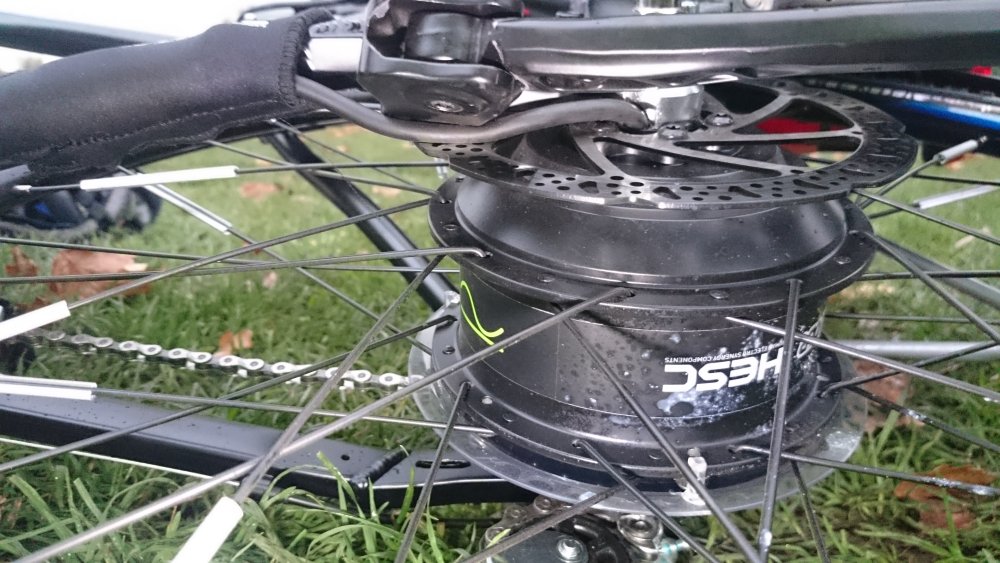
hello, I own this mens version of the Carrera Crssfilre E-bike since beginning of October. The battery indeed is 11ah. I had problem with mine (please check yours!) that the electric cable which runs from the batter/controller to the electric motor was guided in such way that was trapped between the kickstand and the brake disc. This caused that the cable was 'shaved off' by the rotating brake disc. The cable should be placed on the outside of the kickstand as shown on Halfords photos. The whole rear wheel had to be replaced. Apart of that it is a very good bike. I use it to commute to work 9 miles each way and the battery lasts for 2 days and I still have approx 20% left. One question. I have not got much paperwork with the bike for example there was no user guide related to the operation of the computer. Did you get this? For example I cannot figure out how to re-set the trip counter (distance and total distance). I've tried everything but still cannot set it to '0'. Any ideas?