


Zebede
Members
-
Joined
-
Last visited
-
Thanks for the response. To clarify, Website enquiry form sent last week, email sent to you on Monday at 16.30 and to Support yesterday at 12.28. Email being sent to you again now. Thanks
-
Hi, I have been trying to contact Wisper over the last few days, telephone not answered, emails to David and to Support not answered! Are they on holiday, too busy to reply or is there some other reason? Any working contact details appreciated.
-
Hi, I have a 20" rear hub motor with LT3620QI0037NES on the side. Can anyone tell me what this code means and the spec of this motor? Thanks
-
Sorry but that is everything that was inside a very small box. There is the large white connector taking the power and the small connector, presumably control wires. Does that help ?


-
Looks like 3/4 wire direct to motor BUT a separate cable, presumably control wires, go round back of main connector. Difficult to get clear shot. Also noticed what looks like a crushed black wire on motor connection but that would not affect the main battery problem. So, looking for a way to retrofit new system utilising existing Panasonic motor ?
-
Aha ! Yes there is a box on the front fork. That's the good news. I need to find my Allen keys before I can get at it. Will look in the morning and report back. ThanksThanks. The wiring seems to go from the motor, through the frame, and straight into the battery connector on the rear of the bike. There is no obvious way to dissemble this and see how many wires are used !Pics of existing setup as requested


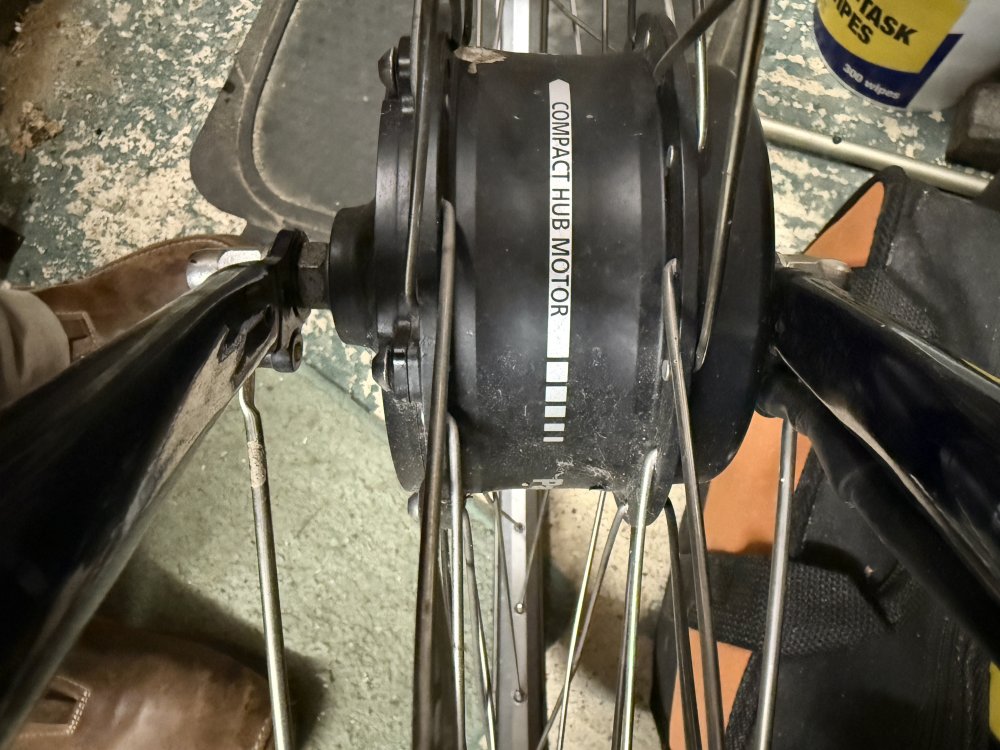 The battery is shot on my Gazelle C7 HF but the front wheel Panasonic motor is fine. Any recommendations for new battery and electronics to fit and save me scrapping great bike. CheersPanasonic front hub motor.I am incensed that my 7 year old Gazelle is SCRAP! Simply because the manufacturer has changed systems and can't or won't supply replacement batteries for the model. Question ? How dependant is the bike on the battery management system ? Can I adapt another 36v battery (or equivalent cells) to fit the connectors on the bike and use that ? Can I retrofit an independent kit and still use the existing Panasonic motor and controls ? At a loss as to what to do with a very good condition Gazelle bike with a knackered battery or do I just chuck it away ? Any polite and helpful suggestions welcome. I would never buy another Gazelle, their head office don't even answer my queries. Total lack of concern for the customer.I have a Gazelle C7 HF and the Panasonic battery is 'kaput'. The batteries are no longer available, either in UK or Holland so the bike - which is otherwise in great condition - is effectively scrap !!!!!! Do I try and refurbish the battery - has dead cells ?? Do I try and fit some alternative battery ?? Are they keyed to the bike ?? Do I strip the electrics and fit a conversion kit ?? Do I just scrap it ?? The Panasonic front wheel motor is fine. It is ridiculous that a very good bike is for 'scrap' because there is no replacement battery available. Any thoughts, advice or help ? CheersThanks folks, found stripped thread and loose fixing on brake causing wheel to move. Think I have fixed it, long ride tomorrow will tell !!Hi. I have a Centros GT with hub gears and a belt drive. The rear wheel is moving out of line despite tightening the wheel fixings and the adjusters. Id the belt too tight and causing the misalignment and how do I fix it ? Reset rear wheel and within half an hour of riding, it is off centre again ! Any ideas ?


