


darrenhoggard
Members
-
Joined
-
Last visited
Everything posted by darrenhoggard
-
Made a mistake and connected to the battery and then plugged in, to a 4 way extension that was already plugged in and turned on. Would you be able to suggest an eBay one if the fuse is ok
-
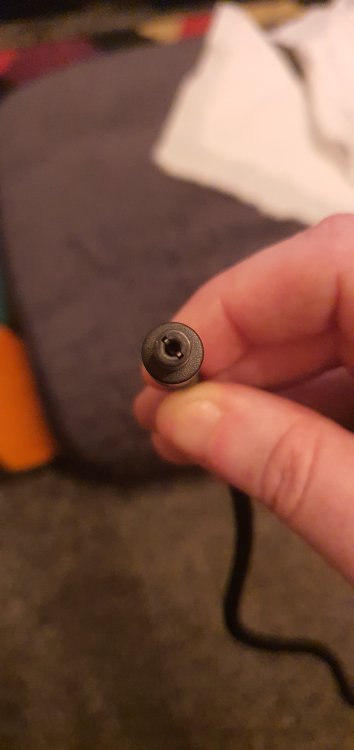
See attched

-
Just plugged in the charger when connected to the battery and something when bang(not too loud) Does this mean the charger has had it or the battery? Charger has no light now. Replacements are 55 quid on Halfords, is there a cheaper alternative? Thanks
-
Hello, thinking of getting a Giant Fathom E+ 3 (2020), is this easy to derestrict? What would be the options, is it a case of fitting a single to the motor? Thanks
-
Hi, I am looking at getting an electric bike using the bike 2 work scheme, my employer uses Cyclescheme so I cant use Whoosh Bikes. I commute daily about 3 miles each way, downhill all the way there, so uphill all the way back - not too steep but constant, I currently have a normal bike, but don't use it as often as I'd like due to been knackered on the way home. I only ride on roads. I weigh about 15 stone and am quite unfit. I believe I am limited to £1000 and cannot add to it. I looked at the Carrera Crossfire-E Mens Electric Bike from Halfords, but it has now gone back to £1200 so out of my price range and also some of the reviews of this are not favorable with regards to cut outs. Any advice would be welcome. Many thanks Darren

