


russdcycle
Members
-
Joined
-
Last visited
-
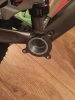
i have been searching the forum re fitting to vitus bike and have come across a potential issue. The photo attached is the same as mine with the 3 extra lugs that might get in the way of the BBS fitting flush. Does anyone have a solution or come across this before. I have grabbed the picture from the thread from 2016 hope that is allowed and not frowned upon? i dont want to order then have a major fitting issue.

-
thanks for replies but i have another potential problem. I found a thread from 2016 where someone had a problem fitting the bbs as there are 3 lugs in the way on the vitus. ive attached the photo from the thread and mine is the same.
-
i didnt realise that the bafang unit is just a on off scooter type drive. I want one that increases while i pedal if that makes sense? does the TSDZ2 do this type of thing? i trialed a bosch system and want something similar but obviously cheaper that i can retro fit to my existing bike
-
I am new to the forum and I am really keen to fit a middrive system to my Vitus sentiere MTB. I have been looking at bafang but the amount of different combinations confuse me. I know about the law and 250w but fancy being a rebel. Is there anywhere near me in Nottinghamshire or Midlands area who stock the system for me to query?