


beanisboy
Members
-
Joined
-
Last visited
Everything posted by beanisboy
-
Thank you all for your help - I finally had time to spruce up the bike. New chain, cassette, front cog, brake pads, brake and gear cables, headset, and saddle. Feels like a new bike! I worked out if I have the front brake connected to the cable, it cuts off and doesn't run on. So that's a work around without getting into electrics. Bike £80, Parts about £100 - not bad for a functioning ebike!

-
I've investigated the brakes. Took one apart, and checked it over. All seems very standard and not tampered with. Switches off and on. I also took apart the throttle. I can't see why that wouldn't work as all looks ok. Leads me to thinking, seeing as it's all original parts, perhaps the wiring has gone weird somewhere. I've had all the connectors apart and wiggled around. Doesn't change anything. If I could find the controller box online I'd take a punt at buying a new one, but I can;t find the model at all - nothing comes up. So maybe I'll leave this annoying brake issue and just ride it. I went 15 miles today no probs. Great bike, and will be even better once it has a service (a pretty major one!)
-
Thanks, I'll check tomorrow!
-
That's interesting - do you think both brakes could have gone wrong at once? And is there a fix,...?
-
I'll check, I have the tools - it does look like a cassette but I'll check. Yeah - 4000miles!!!
-
It seems like a solid bike indeed, and rides well. Considering how much use it looks to have had, it's held up well. I'll get a chain and cassette on order!
-
I think this is a good idea, to ride and be careful. It's an £80 quid bike. It goes well, and it's for short trips. So for now, I'll trundle on as is and see how it goes. Thanks for the help!
-
the other option is just to ride without brake cut off...
-
I have a multimeter. But am not sure how to check things and where to look. If I was to replace the controller, do you know which one will be a direct replacement? I cannot find a Luishi that has the same connections
-
these all come out of the controller
-
And finally, if this isn't too much info, when the throttle isn't plugged in I get error 34 which says faulty throttle (makes sense if it isn't plugged in) But when brakes and throttle plugged in, i get error 34 only whn I press the brakes to cut the motor https://pedegogo.zendesk.com/hc/en-us/article_attachments/360003271833/Dapu___Ananda_Error_Code_Troubleshooting_Chart.pdf Error codes read from this Not sure - maybe better to replace everything unless it's just likely to get a faulty cable somewhere?Oh, and the top button on the display which on long hold turns the unit off and on. When pressed short press it turns lights off and onI know the motor is 300w, or so says the PDF> But it just has the companies branding on it. The battery is 36v 15.6ahThanks AGS - I have located control box, and here are all the photos of what i found


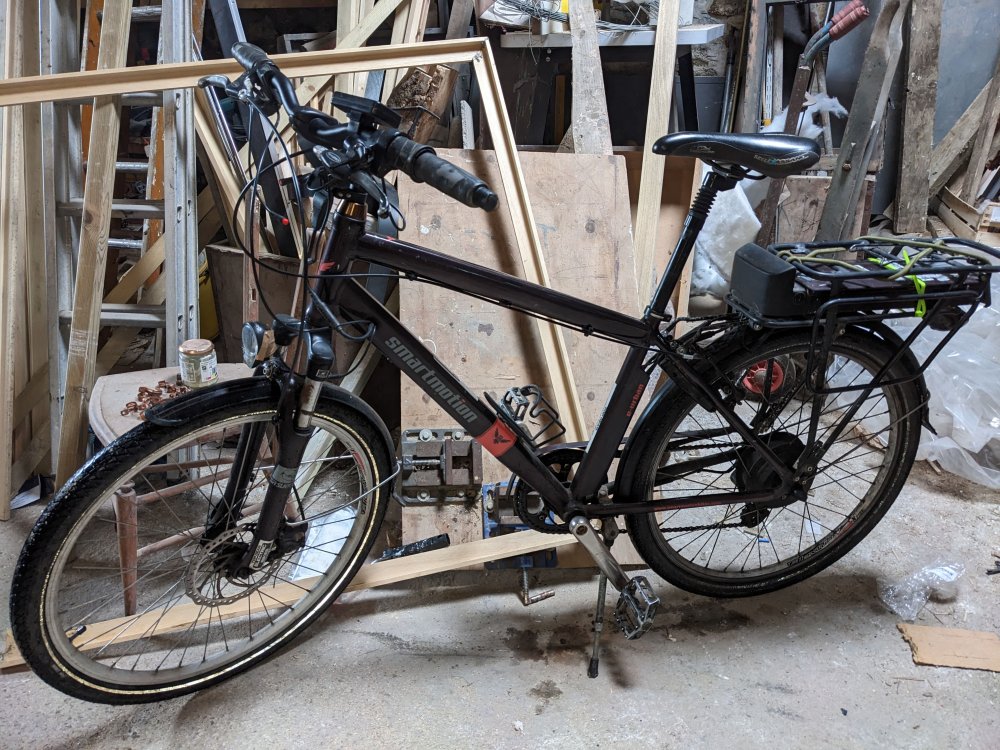 Ok, it must be controller - I just test rode it without brakes or throttle plugged in, and at one point it randomly didnt turn the motor off... so i had to stop and turn whole thing off and on again I maybe need a new controller? Can I use an aftermarket one?Ah, that's just a sticker or something that has faded, the cover is intact and the switch operates properly. I am leaning towards it being the controller, because it's both brakes doing the same thing. And the issue occurs whether or not the throttle is plugged in or not. So it's something weird about the brakes. And it happens whichever brake is plugged in, or whether both are plugged in. As soon as either one is plugged in, the motor kicks in, and only stops when the brake is pressed problem is - I imagine these controllers are specific and hard to get hold of? Hard life yes! but I got the whole bike for £80 ! and the battery seems good, and the motor works well. It just needs new chain cassette and pads And this problem fixingyellow is the throttle wiring, red are the brake wires. The controller is obviously degraded, but seems to work fine. All seem to be original, so I don't think faults in voltage would be an issue... or at least I'd hope not. Also it's inetersting that both brakes make the bike do the same thing. Perhaps the controller itself is at fault? I di knew the model I would replace itGood thinking, but I have looked, and the throttle is a yellow connector and is in the right place. So that maybe rules out the throttle as an issue. Also with the throttle unplugged the brakes still act like throttles - weirdI have just bought a smartmotion e-urban that is 7 years old. Lovely bike, but it has a small fault. When the brakes are plugged into the controller the motor starts running. It only stops when the brakes are pressed. The throttle is also not working, which I don't mind, but maybe this is what is causing it? All works as normal if throttle and brakes unplugged. When i plug in brakes but leave the throttle unplugged the fault occurs, and it also occurs when all three are plugged in. Perhaps a new throttle will help? It seems the controller thinks the brakes are the throttle? I've attached the spec for the bike in case that helps e-urban bike.pdf12mph seems pretty slow, how come it can't go faster?ah yes, cheers, know what you meanThanks - but what is a speed sensor?Can anyone suggest what type of controller and/or motor I could buy for this 20" wheel? If my vattery is 25amp and 36v can I use a 500w motor? I am after the most torque i can get for steep hills


