Skip to content
View in the app

A better way to browse. Learn more.

Pedelecs Electric Bike Community

A full-screen app on your home screen with push notifications, badges and more.

To install this app on iOS and iPadOS
  1. Tap the Share icon in Safari
  2. Scroll the menu and tap Add to Home Screen.
  3. Tap Add in the top-right corner.
To install this app on Android
  1. Tap the 3-dot menu (⋮) in the top-right corner of the browser.
  2. Tap Add to Home screen or Install app.
  3. Confirm by tapping Install.

Njck

Members
  • Joined

  • Last visited

  1. Sorry, I'm at work at the moment and these are the only pictures I have.
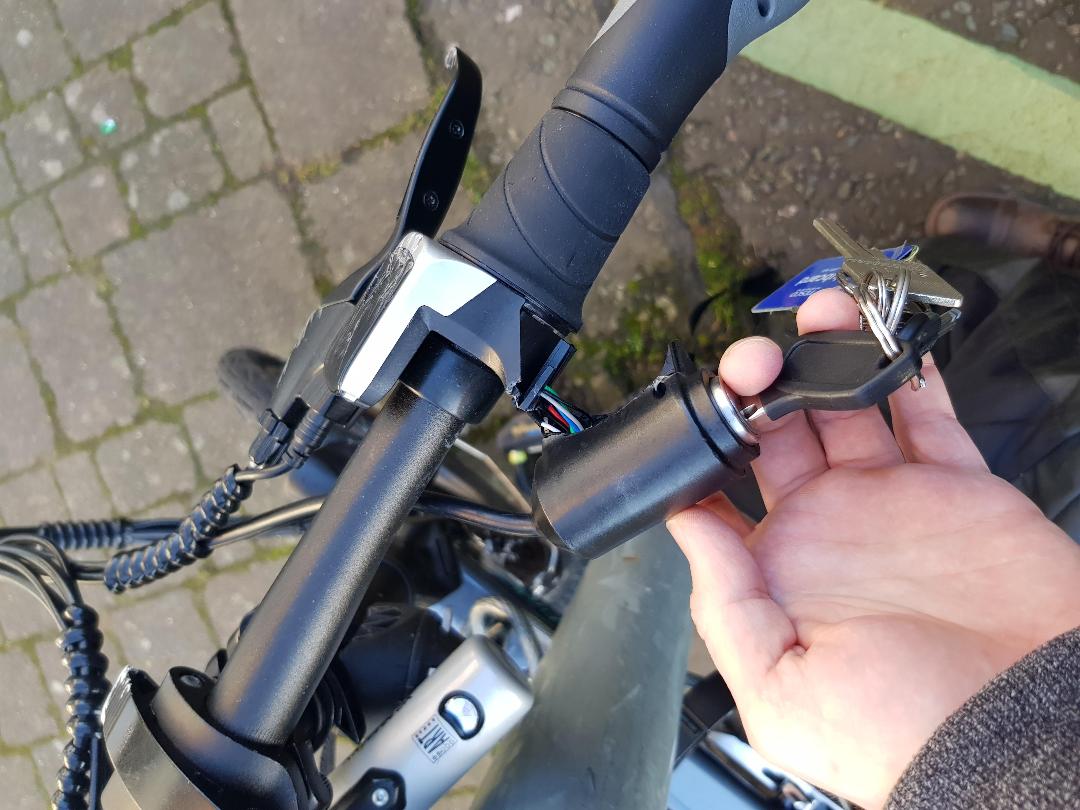
  2. Pictures would help wouldn't they... Stuck them in op
  3. Hi Guys, Had a car pull out in front of me last week and the bike is luckily not in bad shape, only thing that really damaged was the ignition. It turns on and everything works, horn, light, display, but the handle/acceleration is a no go, looking at the state of the wires I can see why. How do I wire this all up?!
  4. Hi Guys, Had a car pull out in front of me last week and the bike is luckily not in bad shape, only thing that really damaged was the ignition. It turns on and everything works, horn, light, display, but the handle/acceleration is a no go, looking at the state of the wires I can see why. How do I wire this all up?!
Background Picker
Customize Layout

Account

Navigation

Search

Search

Configure browser push notifications

Chrome (Android)
  1. Tap the lock icon next to the address bar.
  2. Tap Permissions → Notifications.
  3. Adjust your preference.
Chrome (Desktop)
  1. Click the padlock icon in the address bar.
  2. Select Site settings.
  3. Find Notifications and adjust your preference.