csorel
Members
-
Joined
-
Last visited
Everything posted by csorel
-
Hi all Thanks for your contributions - 'we have lift-off!' The WD40 helped. Also found that take the battery casing apart allowed the locking lug to move freely and with a bit of wiggling I got the key to turn to the (power) On position. Battery then tested at bottom terminals with a digital meter at 40v. Some of the screw lugs of the battery casing had broken so these were reattached with superglue and then reinforced with Loctite Kintsuglue - a moldable/flexible glue/putty https://www.henkel.com/press-and-media/press-releases-and-kits/2018-02-05-much-more-than-glue-loctite-kintsuglue-824138 Battery indicator ontop of the battery shows green lights ie Full. Handlebar display shows all indicators. Power assist Up and Down buttons work. And the bike runs well in pedal assist and throtttle modes. So thanks again for your assistance. Charlie
-
I charged the battery while it was ON the bike. Thanks for the comment on spray lube YES, and graphite NO. Charlie
-
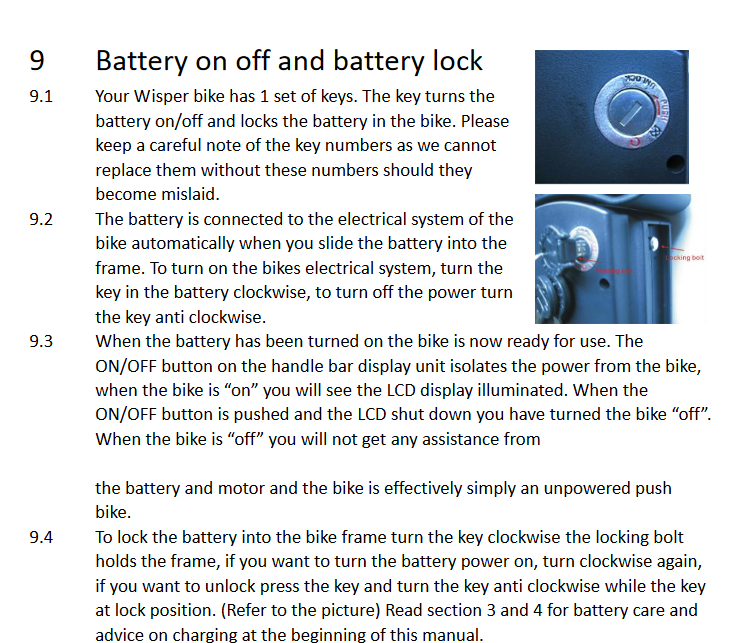
The bike has been little used (under 200kms) and has been in a dry lockup garage for many years. When I tried to get it going (we want to give it away to a needy lady in our retirement village), I was able to connect the charger which showed an orange light for an hour or so and then a green light - so disconnected. This model has the key integrated into the battery casing (extract from Manual with pictures of lock attached) - but I can't turn the key past the Off position, so no Indicator lights on top of the battery, nor response from the handlebar control unit On/Off button. If you think this might be a problem with the lock - can I use Silicone spray into the keyhole or lock casing? What about WD40? Or must I use graphite powder? NB The lock also functions as the On/Off switch for the battery – might spray be a risk of damaging the On/Off switch. Other troubleshooting suggestions greatly appreciated.