


kuksoolchris
Members
-
Joined
-
Last visited
-
After much experiments I must agree with the manual. That motor will not spin any faster than the speed to give 15mph at the wheel. The motor doesn't switch off once peddling faster but is defiantly programmed not to go above 15mph. Very annoying!
-
Hey guys. Thanks for the replys. The manual states that the speed is electronically limited to 15.5mph. I can't find any wires that are linked together but thanks for the post. I would be happy with 18mph on the flat tends to be what I average on runs would be nice if the bike did most of the work up to 18.
-
Hi Oliver. This might be as insulting as asking if the battery is charged but. Have you tried the qr barcode to see if it links to the manufactures website and therefore the wiring diagram?
-
I was wondering if it is possible to remove the 15mph speed limit on the freego hawk for offroad use? Thanks Chris.
-
More pictures. Hopefully this will help.


-
Very wise Mike lol
-
Hi everyone. Joined this forum after buying a pair of freego hawks. One for me and one for the wife. We also have a 1 year old so bought a bike seat aswell. We live 6 mikes from city center. And will be using the bikes to go in and out of town. I will also be using the bike twice a week to go to martial arts class and twice a week for photography club both about 6 miles each way. I live in the highlands of scotland so have lots of weather and hills to contend with.
-
Ok I'm home now and had another look. The wiring is a mess couldn't really get a much better pic. But to break it down. 2 big wires for the battery. A small red and black up to the handlebar control. 3 big wires to motor and 5 small for Hall effect? Black red and white wires from the throttle. Then we have the brake cut off 2 plugs joins together going to red and blue into the controller. The crank sensor. Red and black to the controller and the blue up to the handlebar control? Then it gets interesting the red from the handlebar control I think is the random cut red wire from the loom. The green from the handlebar control goes into a 2 pin plug. Joins up with the brown/red wire. Other wire on plug is blue/red and cut wire. There is a pair of wires going from controler to a 2 pin plug blue/white and violet. These aren't connected to anything. I have drawn a quick sketch.
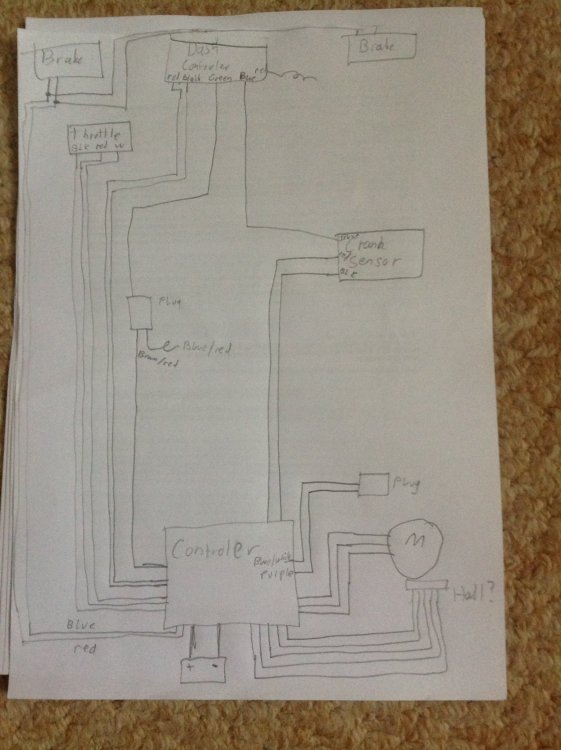
-
Yea A uk version of his might just work
-
Ok will be home by the end of the month, can take more pictures then.
-
The only white wire comes out the controler into a plug, whith no white wire comming out the other side of the plug
-
Sorry working away from home just now so thats all i have
-
No just that one wire if i remember right. there is a plug with 2 wires going in and one out cant remember what the colors were. Any recommendations for a new controller and will it work with the standard handle bar switch?
-
I don't like Panniers for the hastle at the end of the journey with getting clothes and equipment from the bike to the class. I am hoping to find a solution where i can cycle to the gym park the bike and either walk to changing room (still carrying the back pack) or simply grab a bag off the bike and walk. I do have a rack fitted (altho one side has my staff holder attached - this could always be redesigned). How do I go about securing a large kit bag onto the carrier?
-
Hi thanks for the swift reply I am working away from home just now but i took these before I left. Hope they help


