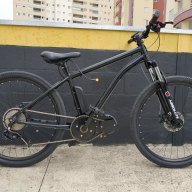
June 25, 20214 yr how to connect external speed sensor with a s866 display? I have a mid drive motor and the display shows the engine speed, but I would like it to show the actual speed on the bike wheel
June 25, 20214 yr You use a wheel magnet speed sensor. If it's a three wire one, you supply it with 5v from any of the 5v wires on the PAS, throttle or hall connectors , and you can pick up a ground there too or use any ground, then you connect the signal wire to the white wire that's in the motor hall connector. If it's a two wire one, like you can cut from a cycle computer, either wire can go to the white one and the other goes to any 5v. If it doesn't work like that, put the second wire to ground. I can never remember which way round it is, though if you want to get it right first time, measure the voltage on the white wire with a meter. If it's 5v, the second wire goes to ground. If it's 0v, the second goes to 5v.


Join the conversation
You are posting as a guest. If you have an account, sign in now to post with your account.
Note: Your post will require moderator approval before it will be visible.