waveydavey
Members
-
Joined
-
Last visited
Everything posted by waveydavey
-
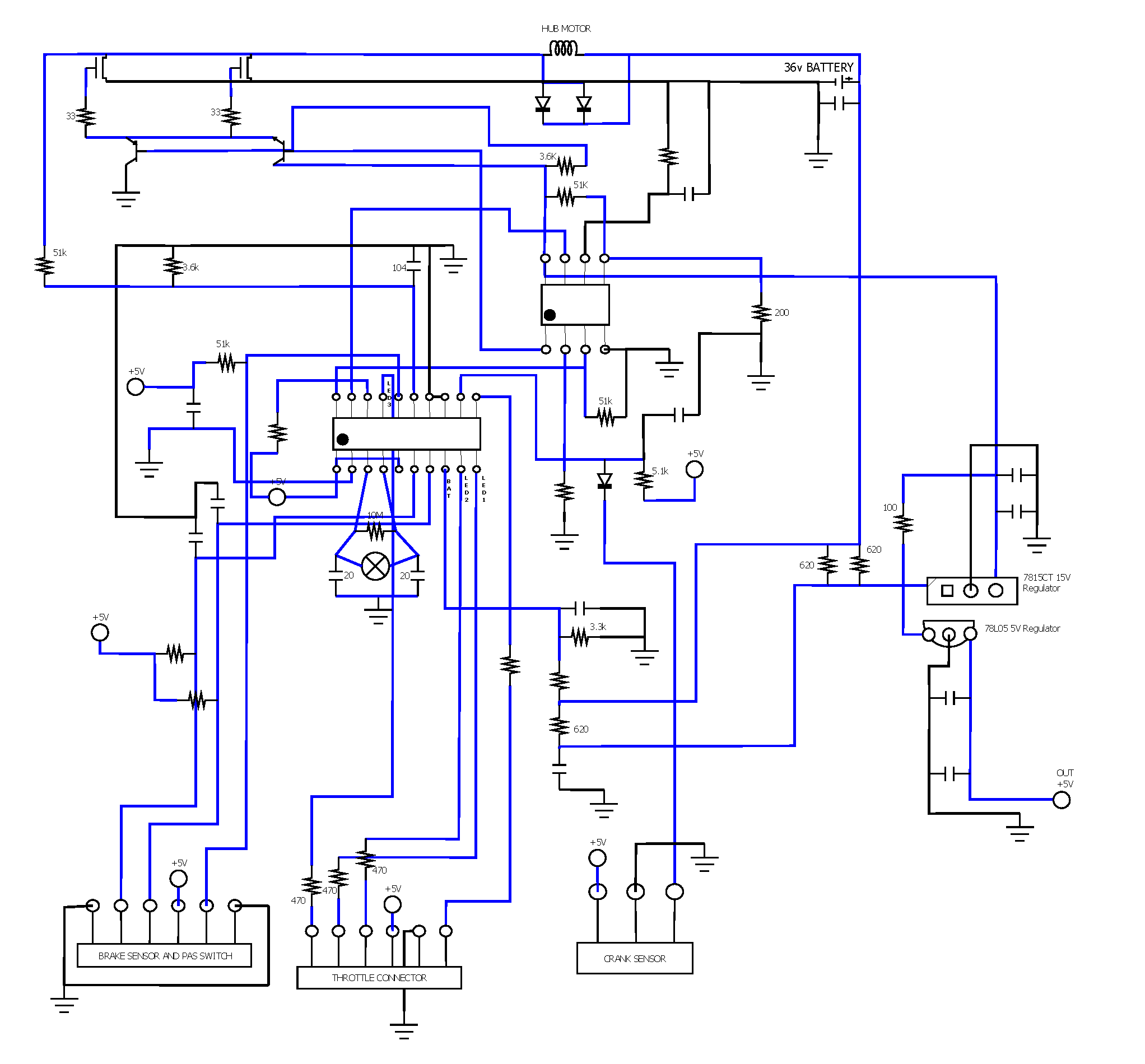
Okay, So I believe I have managed to get this working in the end. I had to trace out the schematic, but eventually narrowed the problem down to two things. 1) A dodgy 5V regulator - generating 1.8v. (The controller board has two regulators on board, a 15V and the 5V) 2) A broken 16MHz crystal. Once these were fixed, I get the 3 lights when I turn the bike on (full battery), and it also passes all of the diagnostics. Just got to reassemble it! It could conceivably still not work, but from testing it on the bench it all seems to be fine. I've attached two files to this post, the first is the service manual from Powabyke, and the second is the schematic that I traced out. The schematic is not pretty, and probably has errors, but it helped me solve my problem, and may be of some help to someone else in the future. (Note: my drawing program doesn't have the schematic symbol for a crystal, so I had to substitute the symbol for a lightbulb). Also, thanks to wheeliepete for kindly offering to send me his old controller board. Cheers! Shopper 2002 Manual 1.pdf

-
Thanks for taking the time to look. The label from my controller mentions the K3602 model number. Its just a guess, but it is possible the K3600/K3601 are 24v and the K3602/K3603 are 36v. Maybe the difference between each pair of models is one has PAS, and the other does not. How much would you like to sell the controller board for? Its worth a shot and if it works, would save me having to replace the throttle on the bike .

-
Cheers Pete. Would be great if you have one knocking around.
-
Yes, my mistake. I think I've spent too long looking at this thing . The wiring through the bike frame is actually prepped for a brushless motor, but at the hub motor and the controller they are shorting out two pairs of wires for the +/- of the brushed motor. I've checked both the mosfets and they are good. When I first turn the key, both mosfets are getting opened for a split second, which turns on the motor and causes the bike to jump. They then close, which is why the bike doesn't get permanent full power. The bike just lurches for a split second. Thanks for that info. You've saved me another headache if I end up replacing the controller. I've got an Arduino knocking around somewhere, but I don't really want to invest that much time in getting the PAS working. It's a nice feature to have, and I'd like to keep it, but if I can't get this board working then I'll just pony up for a new controller/throttle bundle. I think you're right about the processor/motor interface combo, with the smaller chip being the motor interface IC. I could probably get a generic motor interface IC after working out the pins. However, I can't identify the micro-processor. PICs have power/ground on PIN1/PIN20. The 20pin chip on the board has power to PIN7 and ground is PIN13/14. Thanks for the helpful info. It is v.much appreciated.
-
Yes. With all sensors disconnected (throttle, brake, crank), the same still happens.
-
Hi everyone, I'm new to the forum, and electric bikes in general. I've gotten my hands on an old Powabyke Shopper (MK2?) and I believe it's from about 2002. I thought it would be a good introduction to electric bikes without breaking the bank. Just to see if I use it as much as I would hope, before upgrading in the future. Unfortunately, the bike has an issue... When I turn the key, the bike lurches forward about an inch before stopping. The LEDs on the throttle show nothing. Things I have checked: The batteries. Brand new and fully charged (36v). The hub motor (seems fine). Its a brushless unit. I connected 36v to it directly, wheel turns with no problems. The cabling (seems fine). Checked continuity and all seems okay. One of the connection blocks had some corrosion on the pins, but I cleaned it up and then seems fine. The throttle (seems fine) - hall sensor is fine and working, checked each of the 3 leds in the throttle by hooking up a 9v battery and a 360ohm resistor. Each LED lights up when powered. If I remove all sensors from the controller, the bike exhibits exactly the same issue when I turn the bike on. I'm learning towards it being a problem with the controller board. The PCB has the IDs TC213254 and K3603 written on the top, and the label on the controller box says it is a Wistom WST-K3603. I've checked the voltage regulator on the board, which drops 36v down to 15v, and that is working fine. I've checked the MOSFETS and they don't seem to have issue. However, there are two chips on the board, both of which have helpfully (!) had any identifying details ground from the tops of them. The main chip is a 20pin DIP which is socketed. It has a crystal oscillator between pins 3 and 4 which when checked with the scope, is not oscillating. When checking the voltage pins of this chip one of them is reporting 1V, which I believe is the power pin. When the chip is unsocketed and the circuit checked again (without the chip in place), the same pad is reporting 3V. Problem could be an internal problem with the IC? The second chip is an 8pin DIP. Can anyone could shed any light on the two ICs, or at least an indication of what they are? Might one be a microprocessor and the second a brushless motor driver? I could get a cheap controller board from eBay, but one of the features of this bike is the assisted pedalling, which I am lead to believe is not available with the cheaper controllers, and which I would like to keep. Is this true? If not, it will be easier to just replace the controller. Any thoughts or ideas welcome. Cheers!