Pedant peddler
Members
-
Joined
-
Last visited
Everything posted by Pedant peddler
-
366 to 1?
-
Biggest possible issue as already noted is the low current supply (though I'm still planning to fit 6v lights to my TSDZ2).
-
I'm with you on fitted and wired lights. Wife's KTM eStreet has fitted lights and it's much nicer hitting a button on the controller to switch both on rather than my bike which has separate rechargeable lights.
-
Are your Tsdz2 units running stock firmware?
-
Yes, running at 48v reduces the current. The only benefit I am aware of for the 36v unit is it is capable of supplying power at a higher cadence than the 48v unit when using it with the open source firmware(huge thread on endless sphere). If you have no intention of flashing the firmware then it's ultimately personal choice (though the 36v unit can be flashed to run with 48v).
-
I'm certain someone here will confirm soon though my guess is you'll have to strip 10mm of cable and poke it through the hole before pushing the terminal in or trapping the cable somehow. Not great if you're exposing it to rain.
-
They don't look like male spades to me. Are they springy? Possibly designed to accept and clamp a bare cable? No instructions with the light?
-
IIRC the TSDZ2 lighting cable is terminated with female spade connectors. What connection is on the AXA?
-
I'm wary of such though living in Scotland I feel it's possibly better to let water escape, stopping it from getting there in the first place is damn near impossible (as my everything from this mornings ride will attest).
-
I don't need a huge range though I have an abundance of XT60s so will make an adapter to allow use of both batteries if I need greater range (yes the 40 cells will be split between two batteries).
-
Looking forward to seeing this finished. I swapped the bullets for these XT60s... https://www.amazon.co.uk/gp/product/B07C3R5W31/ref=ppx_yo_dt_b_asin_title_o08_s00?ie=UTF8&psc=1 Now awaiting the 40 Samsung 35E I've ordered from Fogstar to build two batteries (son's Oset 20 getting a Lithium upgrade).
-
It may be worth buying a meter, Amazon (prime)£7.99 - https://www.amazon.co.uk/Mercury-600-101UK-Handheld-Multitester-Multimeter/dp/B00LEHK23I/ref=asc_df_B00LEHK23I/?tag=googshopuk-21&linkCode=df0&hvadid=231965104222&hvpos=&hvnetw=g&hvrand=904304744606292708&hvpone=&hvptwo=&hvqmt=&hvdev=m&hvdvcmdl=&hvlocint=&hvlocphy=1007341&hvtargid=pla-423183568457&psc=1&th=1&psc=1 Or Screwfix.com £9.99 https://www.screwfix.com/p/lap-mas830b-digital-multimeter-600v/75337?tc=JB3&ds_kid=92700055262507126&gclsrc=aw.ds&ds_rl=1244066&gclid=Cj0KCQjw0YD4BRD2ARIsAHwmKVnLhkM012SBJkwUrTxqobCgI40kEghDJgSTXTQt8rdk-OdB5FX4KyMaAnbSEALw_wcB either would be suitable. The charger you linked appears suitable. More expensive chargers are likely to be more reliable though not necessarily any better at charging. I have the same battery and charger, happy to assist if I can.
-
Hairon linked in post #14... Note: Please turn on the power switch when you charging this battery pack.
-
Apologies if I missed it though you are aware the battery has to be switched on to enable charging?
-
My recently received (PSWpower) TSDZ2 came with bullets on the motor. The safest bet is to confirm with whichever seller you're planning to buy from. I've since swapped to XT60 as bullets are horrible(IMO).
-
It's 12 according to the Vlcd5 though it's not something I set(or recall setting) when programming the open source firmware that's installed. I've a lot to learn regards the open source firmware though it can wait, having too much fun with it in its current state.
-
The open source firmware branch covers all three of the (factory) displays and while I fancy the more discreet VLCD6 or XH18 I'll likely use a KT-LCD3 as they allow parameter adjustment on the road(plus I'm too tight to pony up for the 850/60. I'm afraid I can't comment on the improvements that the firmware offers as the original firmware was removed before any testing was done. What I can say is I'm very impressed with the TSDZ2 and its smooth and powerful delivery, had the display showing 55Km/h briefly during testing though I've since dialled it down. Happy to answer any questions which will become easier with further use.
-
The 36V is (I believe) better suited to a higher cadence and will run at a lower current on 48V. The firmware flashing was easy, getting the software to install, run and communicate with the TS was less so. I've got it running reliably now and I do love to tinker so will probably swap the display and alter the firmware. I've only done 50km so far though last 10km were wet so mudguards are next.
-
Useful thread which helped me with my foray into electric cycling. My TSDZ2 (36V 250W) arrived from Pswpower a couple of weeks ago and has since been installed on my 2009 Carrera Kraken. Installation was very straightforward though the 48V 14.5Ah Hairon battery (yes I know they're different voltages) was too cumbersome for my liking. It's currently running with the temporary battery fitted in the frame bag while I await fogstar stock replenishing. Various tidying jobs still to do though I'm delighted with it so far. Firmware has been changed a few times (firstly to enable 48V stock) though now running the excellent open source firmware modified for Vlcd5.


-
Where are you based?
-
You won't get the TS on with that, think you will have to use the solution posted in the other thread.
-
Tsdz2 will allow around 5mm clearance for such. I and others have been able to leave these in situ. I sanded the plastic guide and a mm or two off the guide mount screw and managed to slide the TS carefully past. A good photo will likely get you a reply as to whether yours is possible.
-
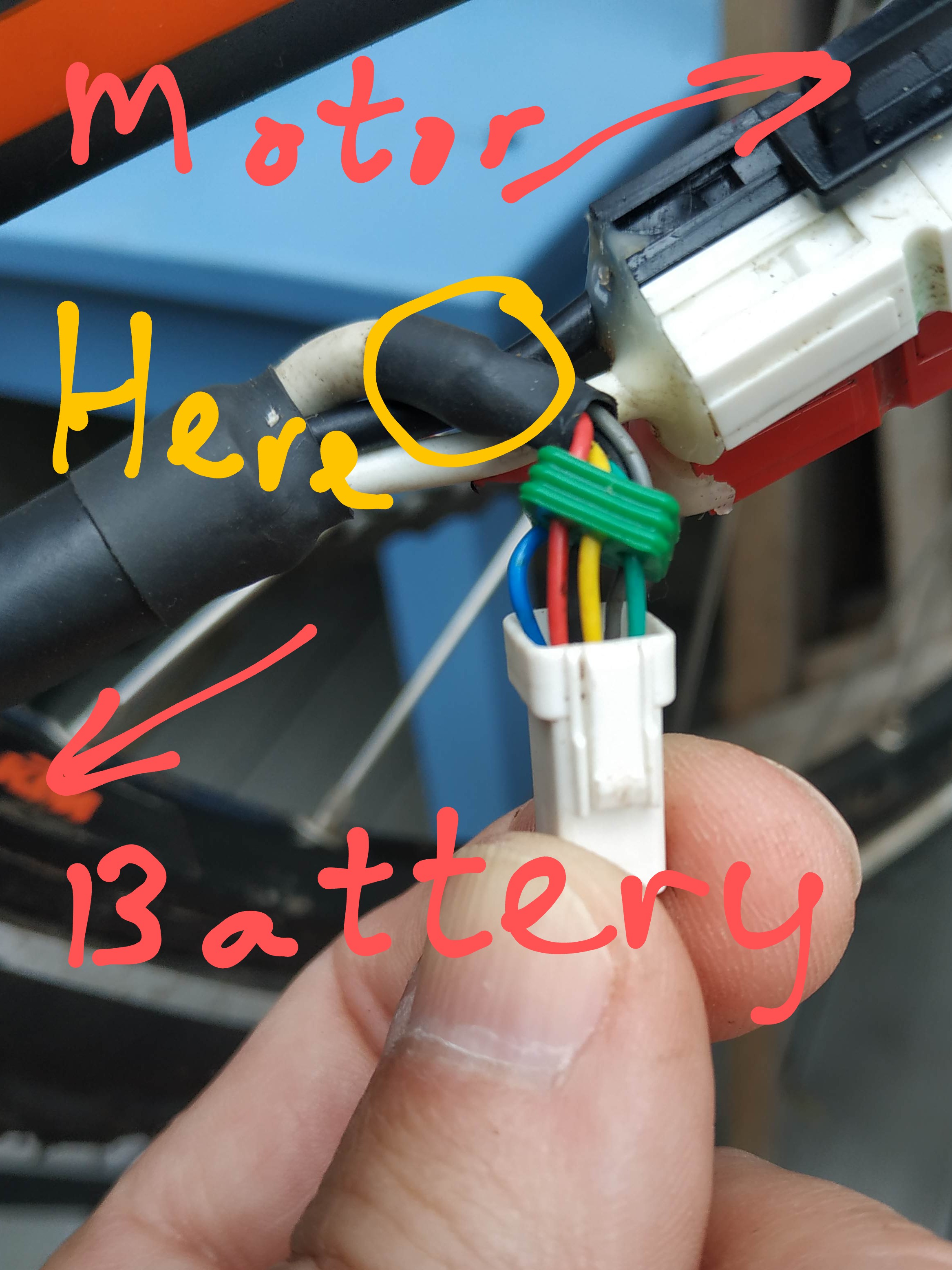
The box on the cable running from the display is a ferrite core, it should be able to slide up and down the cable (mine does at least), it's not related to the fault. I have not yet contacted KTM as the repair I effected is likely to last though their apparent dis-interest is concerning. You need to check electrical continuity on the black wire (from my first photo) running back to the connector at the battery junction. A good bike shop (or even a handy electrician) should be able to manage.
-
More photos will be available later though I managed to persuade the wife to take it to work today (she was suitably impressed). Happy to answer any questions meantime. If you are contacting KTM, the cable required is the one running from the battery/controller to the chain stay connector carrying the 6 pin signal connector and the 3 pin motor connectors. The break is likely to be where the ground sheath is exposed just as it exits the insulation. Yellow circled are is where I suspect you will find the corrosion /disconnection. Carefully cut back the heat shrink, ground sheath is gathered and heat shrinked within. The heat shrink is fantastic at retaining moisture.

-
Good timing possibly as I fixed this on a KTM eStreet p last week. The 6 pin connection on the chain stay had corroded (outer ground shield braid had disconnected due to corrosion) . The protective neoprene cover had been holding moisture and this was fairly obvious upon removal due to the green deposits. Electrical meter confirmed disconnection, currently bypassed with temporary (permanent) jumper wire until I verify the cost of a replacement cable.