Skip to content
View in the app

A better way to browse. Learn more.

Pedelecs Electric Bike Community

A full-screen app on your home screen with push notifications, badges and more.

To install this app on iOS and iPadOS
  1. Tap the Share icon in Safari
  2. Scroll the menu and tap Add to Home Screen.
  3. Tap Add in the top-right corner.
To install this app on Android
  1. Tap the 3-dot menu (⋮) in the top-right corner of the browser.
  2. Tap Add to Home screen or Install app.
  3. Confirm by tapping Install.

scotjimland

Members
  • Joined

  • Last visited

  1. ok thanks for taking the time to explain. I was going to use the USB to power my iphone when using it for navigating, but no big deal, I can use a power pack.. Otherwise the bike is great.. and enjoying it very much, hope to go touring later in the year with it.. cheers
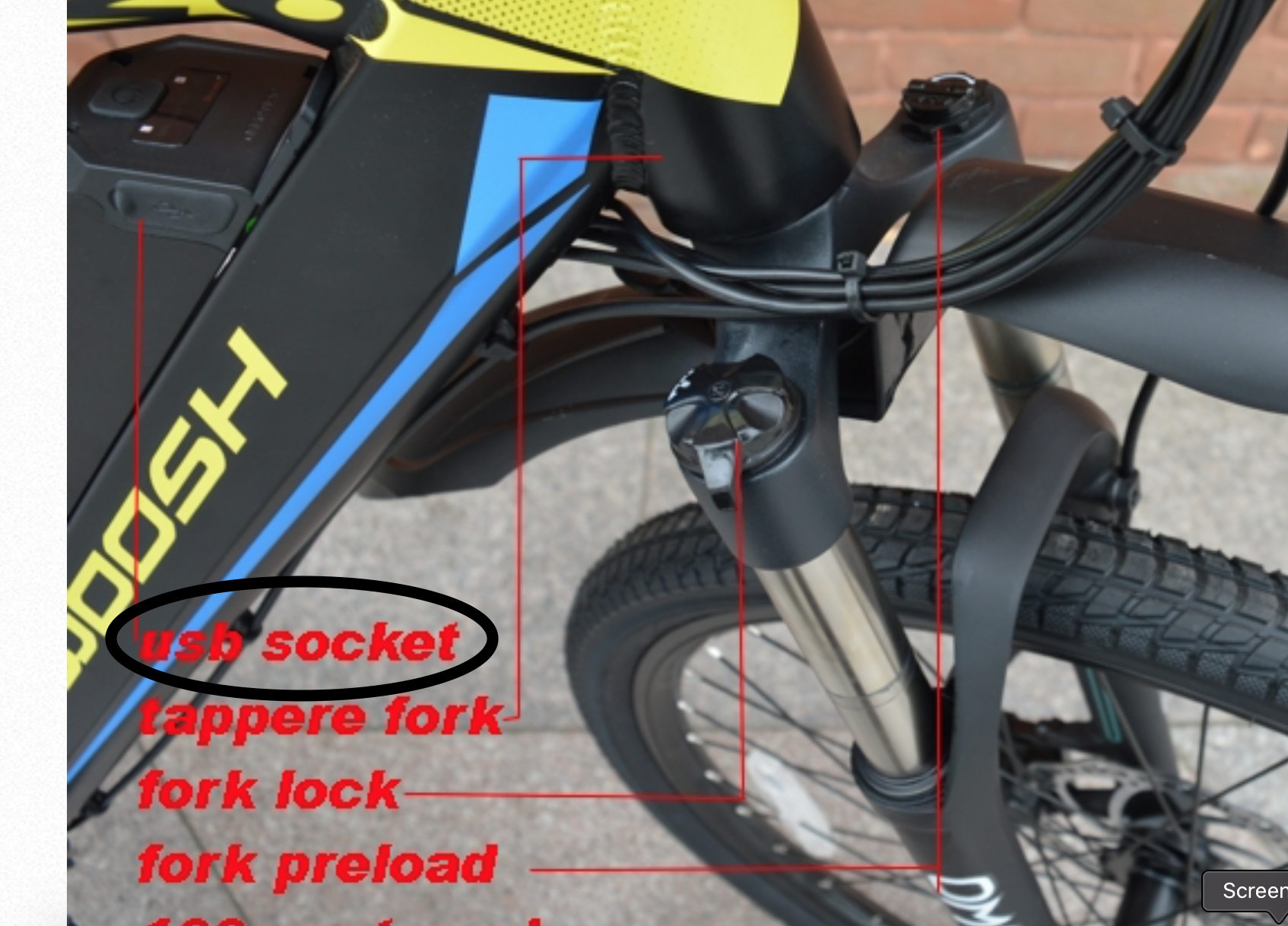
  2. fair enough, but should this should not be pointed out in the bike description .. it's misleading to say it has a usb outlet without saying it's not connected .. reading the thread, Woosh have known about this for some time .. Not doing so also affects the reputation on the company and leads seeds of doubt being sown.
  3. not asking about the forks.. so you are not disappointing me.
  4. thanks for reply, I'm puzzled why this feature is clearly pointed out on photo of the bike, also puzzled why the battery manufacturer fits a usb socket but doesn't connect it..
  5. I can now confirm that there is definitely no output from the USB socket, which is rather disappointing .. I don't understand why it is shown on the Rio pictures on your website saying that there is.. it's not a big deal but it would have been great if it was working. Other than that I am highly delighted with the bike.. will give a ful review once I have a few miles on the clock .. James
  6. ok, thanks.. will soon find out, will be delivered today, but it seems odd that Woosh advertise a feature that doesn't work, it's clearly pointed out in the Rio pictures with a big arrow. It's. like saying it has a nice bell but it doesn't ring or lights that don't work.. I've read all the Rio manual and can find no reference to it.
  7. Just bought a Rio and expecting delivery tomorrow , is the usb socket still not connected ?? if not that is very disappointing ..
Background Picker
Customize Layout

Account

Navigation

Search

Search

Configure browser push notifications

Chrome (Android)
  1. Tap the lock icon next to the address bar.
  2. Tap Permissions → Notifications.
  3. Adjust your preference.
Chrome (Desktop)
  1. Click the padlock icon in the address bar.
  2. Select Site settings.
  3. Find Notifications and adjust your preference.