


MikeyRides46
Members
-
Joined
-
Last visited
-
-
-
-
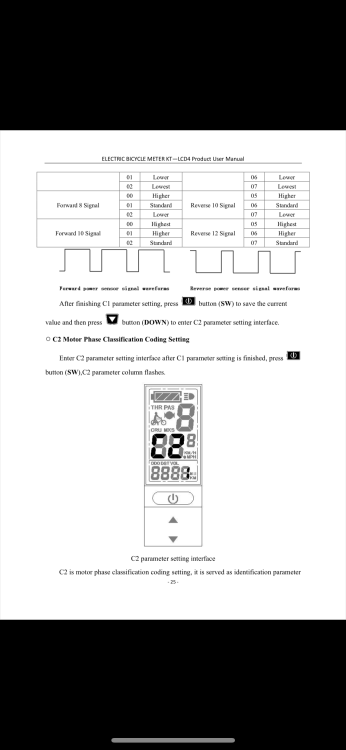
Hi I have been unable to get my new KT controller to operate other than to provide power assist at walking pace mode. I am sure that I have overlooked one of the parameter settings. Here’s the kit 1x kt36 brushless controller 1x ktlcd display 1x 12 magnet PAS sensor (this works on my other lishuj controller) 1x front wheel motor frame my Yoshi e-bike conversion kit See photos attached. I am unable to get any PAS other than walking mode (by holding down arrow on display unit) I have attached photos of part of the controller manual as I was not sure what setting to choose. I have made an assumption that the PAS sensor would work with a KT controller. It does work perfectly with my lishui controller (on the same bicycle). . I wanted to swap the controller so that I could use the lovely ktlcd4 display rather than the large C500 display that came with the lishui conversion kit. I hope someone can advise on the settings. thank you!


-
Thank you for the advice.
-
Thank you
-
Apologies. 8 not 9 pin connector
-
I found a KT controller and had a dinner question. So please excuse me for asking. The controller has a female 9 pin (JULET style) connector. The KT-lcd4 has a 5 pin JULET (green male) connector. I thought that strange but wondered whether the connector would fit and work?
-
Thank you. I will look for a lishui controller rgds
-
Hi I have a KT-LCD4 display which does not fully operate my YOSHI front wheel conversion kit now poweeeing my bicycle. I am aware that the unit is not compatible with my lishui controller but nevertheless wondered whether a simple rewire of the 5 pon JULET would work? I have purchased 1x 5 pins JULET cables, each with one end plain wires so think I could connect the correct words once I work out which ones. Currently the display powers the pas assistance and works fine for five minutes. I then have to press the on button and get another five minutes. I do not see displayed: Battery charge Speed Distance I do see PAS but suspect that it is always level 5 and runs for five minutes only which I can live with if need be. Does anyone know whether I can match the 5 pin config for the display to that of the output of the controller? It would be nice to get the battery strength to display. The display that came with he kit is a c500 which works fine though is a but big for my liking. The KT-4 is really slim and looks great Thank you all!
-
Thank you all for your replies
-
Made the changes. The display only shows a max speed of 10 KMH so I think I will reset the wheel size to 700C.
-
Yes I am using the c500. I also tried the KT LCD4 display yesterday but this does not show any speed or battery condition and after 5 minutes switches off although whilst it is on you can feel the PAS. Would be nice to be able to get the full display features. I did like this small screen size though and can handle having to turn it back on after five minutes.
-
I have a YOSE 250w front hub. I set the wheel size to 16” but left the speed displayed in MPH rather than KMH. Did not see the speed display much more than 10-14 MPH but the bike felt fast and I completed my commute in a time which translates to a 20 MPH average. I will now set the display to KMH and see what speed is displayed. Rgds Mike
-
Thank you for the quick reply. I will try the setting tomorrow on my commute!


