Hurcombe676
Members
-
Joined
-
Last visited
Everything posted by Hurcombe676
-
Brilliant thank you so much will check tommorow morning
-
San eagle would you be able to tell em what else to check for before buying these new controllers and then it still don't work like how to check if the throttle works and the motor for instance while I've still got this multimeter I've borrowed
-
The defective one is the smaller one with less wires which I think is for the front wheel. The other controller with all the extra wires is for the rear wheel from what I've read but I tried plugging that in and trying it but no response from throttle or anything which has left me puzzled
-
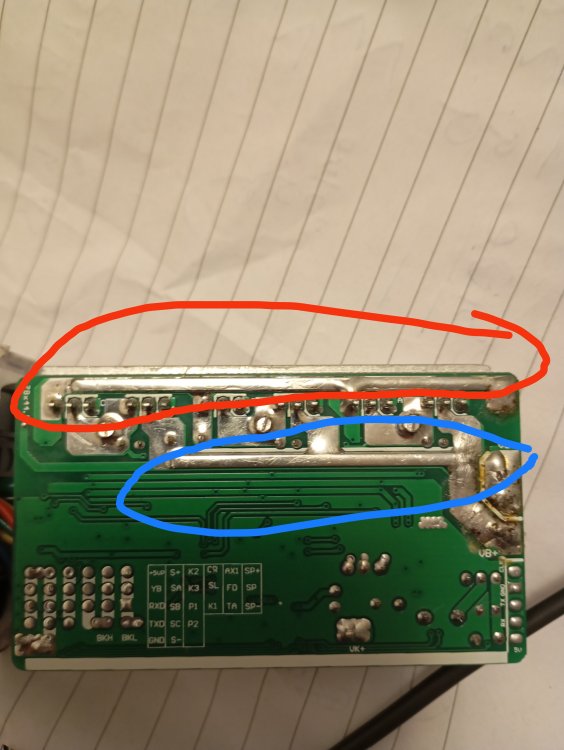
Red probe along track at top circled in red with black probe on red , green , and blue separately It says between 7.62k and 7.71k through the 3 wires at separate tests Red probe to lower track circled in blue I get 0.L on all three tests
-
It's the lower one in photo 51 am I testing the wrong track ? Il check the top now to confirm
-
I've just placed PCB on some paper and tested making sure my fingers weren't touching and now getting 0.L
-
Don't quote me on this but I read on a few various sites online that if it's showing less than 8k then it's damaged is this correct ?
-
My fingers could of been touching yes, very fiddly to do haha. Il put it on a worktop surface when home and do it again and also what you asked me to do and will take photos to be sure.
-
Theese are the result I got with the units on the controller 1. Red probe to red battery and black to blue it came up as 9.24 m To yellow was 9.28m Green was 9.33m Red probe to black on battery connector Blue 7.62k Yellow 7.71k Green 7.64 k Controller 2 has 7.62k on all 6 tests
-
The controllers were from the manufacturers website for This model and looks identical so I'd hope so. Okay sorry I'm a plumber I'm totally rubbish with electrics haha water and electrics don't go well together. When I watched a video earlier on the MOSFETs it stated what was what but I have no clue how to do it as it don't show on the PCb which is which. The MOSFETs are all 3 pin is there a specific way to test these, once again thank you so much for your help
-
I tested along various points of the part circled I'm not sure if that was correct or not

-
The lower track starts off at at 13.5 far left the middle of track and ends up to 25.7 far end. If I was just to buy the replacement controllers as this is getting abit technical for me and I don't really know what I'm doing haha, would it just be a case of plug and play and it be back to normal or is there more to it ? Also being the tech wizard you are could you tell me how to check my throttle on multimeter to confirm it works okay for peace of mind. Thank you so much for your time and patience it's very well appreciated
-
Sorry to sound stupid when you say track so you mean the pins on each MOSFET or do you mean the long silver bar of solder ?
-
Now while checking again is constantly dropping right down again ? New controllers needed ?
-
Now I have 5.2 ohms on all 3 colours with red probe on red wire, yesterday I couldn't get a reading atall, very strange
-
Just checked it again and where as yesterday I was getting no signal from red prope to red battery wire whatsoever, it seems to be climbing was on 2.0 earlier now Its creeped up to like 3.8 , I'm finding this very strange
-
Very strange I took the controller casing off and checked the MOSFETs which all were consistent and then suddenly now I'm getting a signal when using the red probe on the red power lead I'm getting like 2. 0hms now where as yesterday it wouldn't even register on the red power wire ? Awfully strange
-
I can't physically see anything wrong with this pcb


-
Okay thank you so much for all your help, il open the controller up tomorrow and see if anything stands out and il upload photos and see if you can get me back on my quest to having a working bike
-
If I was to just replace the both controllers , it's £100 delivered for the pair. Would it just be plug and play so just connect the new ones and away we go or isit more to it ?
-
Funny enough I can solder I was a solder technician on Panasonic TV years ago but don't own a soldering iron anymore haha. I just seen a video on YouTube about a broken MOSFET. When touching probes together I get about 10.0 when it settles
-
I get this same as when the probes are in the air.


-
Sorry I should have clarified abit better, when on the ohms setting touching red probe to red power and then black to each of the thick wires the display stays the same saying 0 but then as soon as I put the red probe on the black power side and then the 3 colours I get 7.6 ? Does that make any sense ? If not I shall take a few photos in the morning to explain what I see, it may be easier, and thank you so much for your help your a absolute gentlemen.
-
Sorry if I sound stupid but I'm confused, I thought I just put the setting on the omega symbol and put the red probe onto the red power wire and then the black on each of the blue, green, and yellow terminals ? Am I missing something? Sorry if it sounds daft I'm not too good with a multimeter
-
It is controller 1 the one that had the melted wires/ charred terminals. I shall check in the morning regarding what comes up on the multimeter, I think it was just showing as 0. The display just stayed the same . And as soon as I used the red probe on the black power terminal it moved straight away up to 7.6