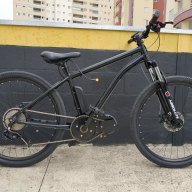
October 27, 20214 yr I would like to share with everyone my electric bicycle that I assembled using parts of a scooter , with a central motor and it was very good !
October 27, 20214 yr Author Do you carry the battery in your backpack? yes , the battery is stuck in a Styrofoam holder to not move , and is inside the backpack !https://youtube.com/shorts/fMaf6OZO5YQ?feature=share
October 28, 20214 yr Author in this video , I explain how I set up the support and made the download of the project available to everyone , this video description on Youtube :
October 28, 20214 yr Which hub motor is that you are using ? The engineering is and looks very professional for a very nice installation did you machine the housing or was it done for you ? Edited October 28, 20214 yr by Nealh
October 28, 20214 yr Author Which hub motor is that you are using ? The engineering is and looks very professional for a vary nice installation did you machine the housing or was it done for you ? I bought the used engine in my country, on Aliexpress has the same engine for sale, 36v and 350 watts R$ 440,01 34%off | 48v electric scooter wheel axle, brushless motor, toothless https://a.aliexpress.com/_mtqJpCK


Join the conversation
You are posting as a guest. If you have an account, sign in now to post with your account.
Note: Your post will require moderator approval before it will be visible.